
Release Notes 2026-Q1
This document describes the changes in the latest version of SmartTrade for Business Central that is available from the 1st of April 2026 and can be downloaded / updated from Microsoft App Source.
Note
All functionality described in previous release notes still are available unless described otherwise in this document.
Productivity Enhancements
General
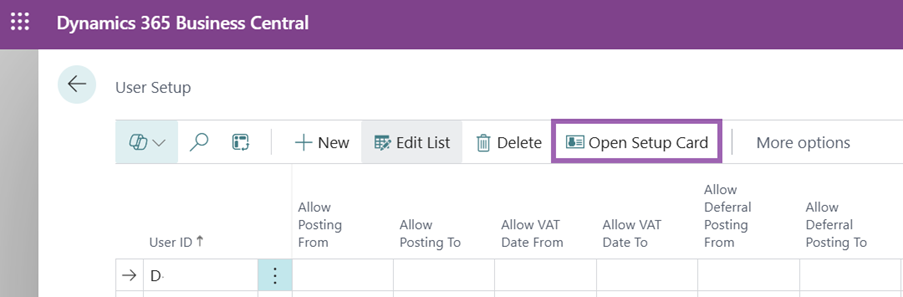
User Setup as Card Page
A separate screen is now available for the user setup, providing a clearer overview of the numerous configuration fields.
Exclude line quantities from availability
When calculating availability on a line, the line quantity itself is now excluded. This logic, previously applied to sales orders, has been extended to assembly and production lines.
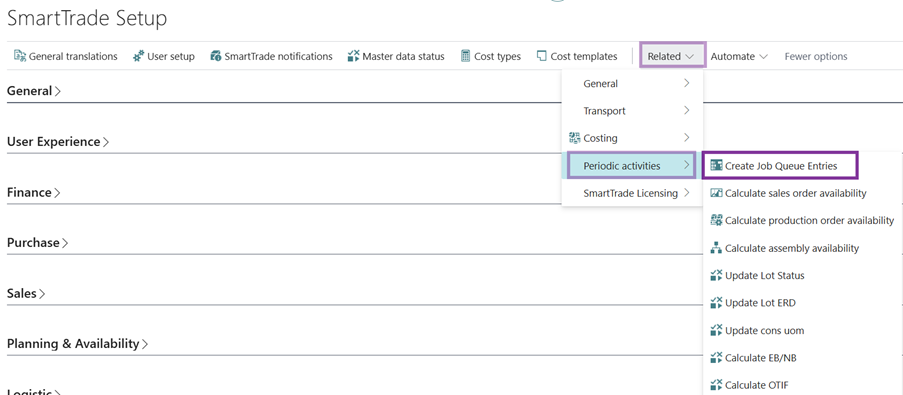
Manually start periodic activities
Certain activities can be placed in a job queue via the SmartTrade setup. These activities can now also be executed directly from the setup page.
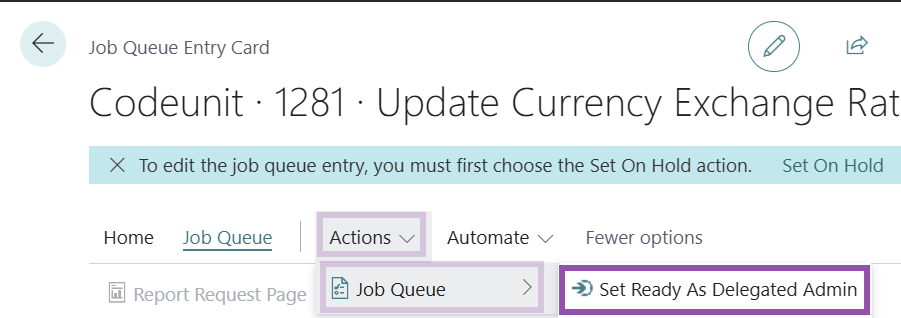
Start job queues as delegated admin
A function has been added to the job queue card page allowing users to start an entry as a delegated admin.
Removal of basic/premium distinction
The distinction between premium and other functions in the SmartTrade settings has been removed.
Assembly orders drag and drop
Resolved an issue where drag and drop attachments on assembly orders were not correctly transferred to the archive.
Supply Chain
Volume calculation per outer packaging
The SmartTrade purchase lines screen now displays the volume in cubic meters (m3) per outer packaging unit. Field is hidden by default and may be added through personalization.
Production and assembly
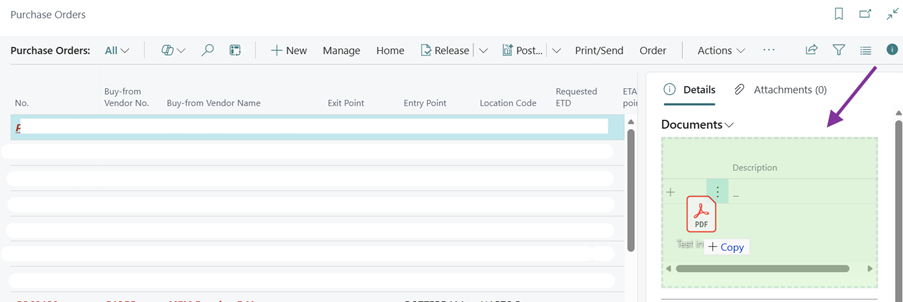
Drag and drop support in production order screens
Drag and drop functionality has been implemented across various production order list and card pages for easy access to store files connected to documents. This feature is only available in case Continia Document Capture is activated.
Display components in planning worksheet
Component lines for production items can now be made visible directly in the planning worksheet. Users can configure via User Setup whether this is displayed in a factbox or directly below the planning lines.
Display availability in production orders
At the bottom of production screens and overviews, lines can now be displayed directly with their availability status. This is configurable via user settings.
Direct display of component lines with status in production
In production screens (released, planned, etc.), component lines are now directly visible along with their availability status.
Display component availability in planning worksheet
The planning worksheet now allows for the direct display of all component lines, including their current availability status.
Inventory availability
Display availability as text
For users who prefer text over color-coded symbols, it is now possible to display availability information as a text field.
Promised delivery date in availability
The promised receipt and delivery dates are displayed within the planning lines for availability per event and lot.
Traceability
Inherit lot numbers on credit notes
When creating a credit note for an item with lot tracking, the lot number is now immediately visible on the credit lines.
Include production quantities and components in lot availability
Production orders and component lines are now visible within the availability per lot.
Single Lot and New Lot Availability features enabled by default
The "New Lot Availability" and "Tracking at Line Level" functions are now enabled by default and are no longer optional features.
EDI
Sending EDI Credit Memos
It is now possible to send EDI credit memos directly from Business Central.
Update EDI message after reading
When reading an EDI message that lacks an invoice-to address, the system now retrieves the address based on the invoice customer. If still not found, it falls back to the invoice customer's PO Box number.
Extended item texts in EDI orders
Extended item texts are now included in orders created via EDI.
Cost calculation
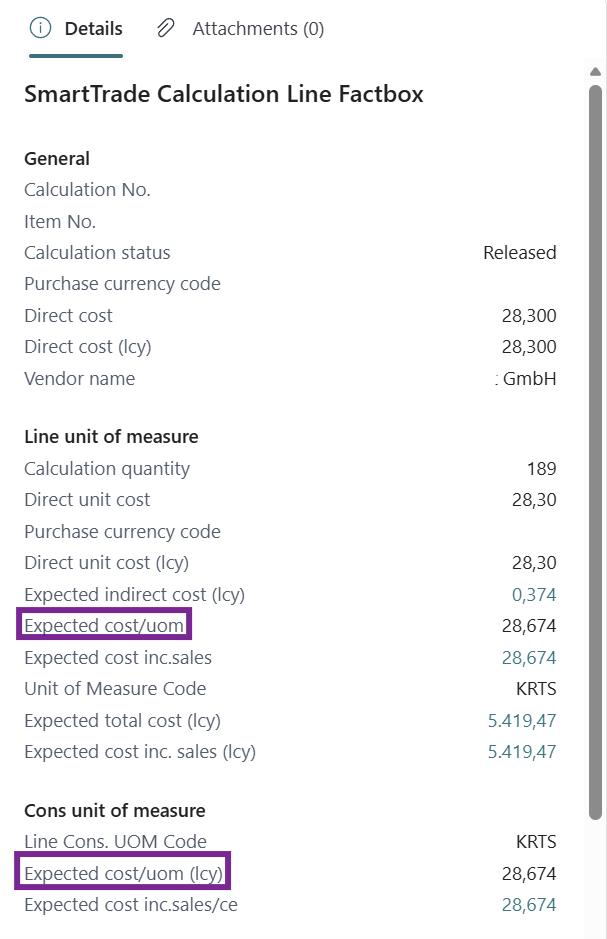
Display cost price sales cost excluded in factbox
The calculation factbox now displays the cost price excluding sales costs such as last mile delivery. A separate field is available for cost including sales cost. This includes both direct and indirect sales costs.
Option to show only cost lines
A button and shortcut key combination CTRL+K have been added to view the summary of an item line on a purchase or sales order, focusing on calculation lines.
Display covered exchange rate and status in factbox
The status and exchange rate of a covered currency can now be made visible on the calculation factbox. This information is hidden by default.
Storage cost type selection
Previously, a cost type calculation (e.g., interest, storage) could only be added once per cost type. An "Other Calculation" option has been added that can be used multiple times.
Extended text
Visibility of messages per item
Notifications and messages per item were previously only visible if entered with the same language code as the purchase or sales order. This dependency has been removed.
Display messages for assembly and production items
Pop-up texts linked to an item are now displayed when entering assembly and production orders, provided the settings are correctly configured.
Problems solved
General
Copy item with 'Copy All' option
When selecting the "Copy All" option while copying an item, all SmartTrade-specific fields and checkboxes are now enabled as a logical consequence.
Content quantity error when copying items
When copying an item, content fields and consumer unit information are now only included if related units are also copied.
Sorting and fields in document container screen
The document/container screen now opens with the correct sorting and includes the necessary fields on the card.
Application Area persistence
Resolved an issue where the Manufacturing application area could disappear from the table even if enabled in the SmartTrade Setup.
Blanket contract changes and sales prices
When a blanket contract was modified on a line, the new price was not retrieved if the line number remained unchanged.
Finance
Automatic population of cost type code in journals
When selecting an account number in a general journal, the default linked cost code was not being inherited.
Margin calculation in foreign currency
Margin calculations for orders in foreign currencies, which previously defaulted to 100% or 0, are now calculated correctly.
Currency revaluation critical error
Fixed a critical error (entries not in balance) that occurred during currency revaluation when the "automatic" posting option was disabled.
VAT number in journal entries
The VAT number of a location is now transferred to the general ledger entries.
Rounding of sales prices
Corrected an issue where unit price rounding was incorrect when the sales price per consumer unit exceeded three decimal places.
Sales
Ship-to address selection from customer screen
Resolved an issue where the ship-to address was cleared after selection when creating a document directly from the customer screen.
Customer change on order with ship-to address
Changing the customer number on an order now clears the ship-to address, preventing potential validation errors.
Sales price based on delivery date
Resolved an issue where sales prices on order lines were not correctly updated based on the requested delivery date at the line level. The system incorrectly defaulted to the requested delivery date from the order header, failing to apply date-specific pricing (e.g., price changes between February and March) when lines had different delivery dates.
Supply Chain
Lead time calculation based on lead time fields
Resolved an issue where planned and expected receipt calculations were not correctly utilizing lead time fields.
Goods in transit position
Resolved issues where ETA, ERD, and vessel name fields were not consistently populated for incoming goods in the item position.
Transport time adjustments
Adjusting transport times between entry and exit ports now updates the underlying lead times per item and vendor.
Calculation of purchase quantities
Purchase quantities were not calculated if the "blanket contract" field was not enabled in the availability settings.
Adding purchase orders to second transport order
When adding a purchase order to a new transport order, the transport order number was applied to lines already assigned to another transport order.
Update transport order in lines after posting
When posting a transport order, the transport number was incorrectly applied to lines that were not part of the transport order.
Removing transport lines and container numbers
When a purchase line is removed from a transport order, the associated container number is now also cleared.
Purchase price conversion per consumer unit
Insufficient decimals were used when converting direct unit costs to a price per consumer unit, leading to incorrect direct unit cost per CU. This has been resolved.
Undo purchase receipt and lot tracking
Corrected an issue where an incomplete purchase receipt line left an incorrect location code in the tracking line on the purchase order.
Transfer orders for undone purchase receipts
When a purchase receipt was reversed and the order was subsequently re-posted, the negative adjustment line was incorrectly included in the transfer order. This has been fixed.
Transfer order creation issues
Fixed issues in the creation of transfer order lines that previously resulted in duplicate lines within a container occasionally.
Opening transport info on transfers
Fixed an error that occurred when opening a line in the availability for goods in transit where no transfer order existed.
Production and assembly
Status on production orders
Clearing the issue status on a production order now updates the associated status symbol and/or colour.
Planning worksheet display
The planning worksheet now displays planning lines instead of BOM component lines at the bottom of the screen.
Production line availability and remaining quantity
Availability calculations for production order lines now use the remaining quantity instead of the production line quantity.
Production component availability and remaining quantity
Availability for production components now uses the expected quantity instead of the remaining quantity.
Production quantities and finished orders
Finished production orders were incorrectly included in availability calculations. These are now excluded.
Production availability with selection filter
Users can now select multiple production orders and recalculate availability for the entire selection simultaneously.
Production line availability and location filtering
Availability displays for production lines now respect the location filter.
Availability on firm planned production orders
Corrected the logic for updating production order status when one or more components are unavailable.
Availability per event for production/assembly
Production and assembly lines were missing from the ‘Availability per Event’ view. They are now included.
Inventory availability
Logistic planning colours
Colours in the logistic planning screen now correspond consistently to the calculated values.
Availability colour on order lines
Fixed an issue where order lines were marked as unavailable when the stock level exactly matched the order quantity.
Availability per event
If the release status table was empty, a negative line was added to the availability for every inventory line.
Availability calculation after order quantity entry
The availability status and colour are now recalculated immediately after entering a quantity on a sales order line.
Availability and blocked WMS bins
The availability calculation now correctly accounts for inventory located in blocked bins.
Item position for damaged/unavailable stock
Items with inventory at an unavailable location (e.g., damage location) were not visible in the item availability overview. This has been corrected.
Multiple unavailable locations in availability
Resolved an issue where multiple locations with unavailable stock caused incorrect displays in the "Availability per Event" view.
Location filtering in Availability per Event
In the "Availability per Lot and Event" view, changing the location filter now updates the detail lines.
Incoming goods availability description
The description for incoming goods in the availability per lot has been adjusted from ‘Inventory + Location’ to ‘Vessel Name + ERD.’
Bin availability permission error
Resolved a permission error related to warehouse entries that occurred when changing the availability status on a bin.
Drilldown on availability for items with serial numbers
Fixed an issue where drilldown from ‘free on inventory’ fields did not work for items using only serial number tracking.
Drilldown on availability status
After the availability status of an order line had been modified, accessing several screens would not function properly.
Reservation and availability field conflicts
Separated availability information and reservation issues, which previously shared a field and caused errors when opening tracking lines.
Availability calculation on non-item lines
The system no longer attempts to calculate availability for non-item lines (e.g., text lines) on quotes, preventing unnecessary error messages.
Cumulative counting of blanket contracts
Blanket contract lines are always shown in the item position, but they no longer count towards the cumulative total if the contract calculation setting is disabled.
Traceability
Release status and expiration date on lot receipt
Resolved an issue where receiving an item for the second time always sets the status to quarantine/not released and incorrectly filled the expiration date.
Expected cost assignment on sales lines
When assigning a lot number to a sales line, the expected costs from the lot number were not being inherited by the line.
Currency information on lot numbers
Resolved an issue where currency information on lot numbers could not be modified.
Release status and expiration date on lot receipt
Resolved an issue where receiving an item for the second time always set the status to quarantine/not released and filled the expiration date automatically.
Availability per lot for transit and free stock
Fixed a display issue where lot availability was not correctly shown when a single lot number contained both cleared and customs (transit) inventory.
Drilldown for items with lot and serial tracking
Corrected the drilldown functionality for items that utilize both lot and serial number tracking.
EDI
EDI invoice-to address validation
The error triggered when no EDI profile existed for an invoice-to address in a message has been downgraded to a warning.
Invoice-to address based on order customer
If an EDI message lacks an invoice-to address and the order customer has no invoice customer, the system now uses the order customer's address or PO Box.
EDI settings when converting quote to order
If a customer is an EDI customer at the time of quote creation but not when converted to an order, all EDI fields are now cleared as may be expected.
Cleanup of EDI envelopes and messages
EDI messages with the status "Imported" were not being removed during cleanup processes.
EDI processing with unknown BY
EDI messages with an unknown ‘BY’ code are now successfully imported instead of triggering a processing error.
EDI import with names in UNB segment
Resolved issues where names included in the UNB segment caused EDI import failures in some cases.
Reading EDI delivery date and time
When importing multiple EDI files, the date and time from the DTM+2 segment were not always correctly processed.
Cost calculation
Price per consumer unit display
Corrected the display of the price per consumer unit when entering the unit price.
Recalculating cost lines
When recalculating a single line in the cost calculation, unrelated lines were previously being included. This has been corrected.
Direct unit cost on sales lines
Resolved an issue where the ‘suggest last purchase price’ setting applied an incorrect cost price on sales lines when working with multiple currencies.
Direct unit cost in cost lines
Resolved an issue where the direct unit cost was not correctly displayed within cost lines.
Purchase contract quantities in item position
Corrected the display of remaining quantities in blanket purchase contracts when orders have already been created from them.
Sales price calculation and decimals
Resolved conversion of consumer prices to unit prices to ensure the exact number of decimals is maintained throughout the calculation.
Calculated cost price with multiple lots
Fixed the cost price calculation logic for purchase orders involving three or more lot numbers.
Cost price factbox per lot
Direct costs are now correctly totalled in the cost price factbox even if a removed lot number with attached direct cost is no longer explicitly linked to a cost calculation.
Sales price conversion for base units
Fixed the conversion from unit price to price per consumer unit for items where the base unit of measure is equal to the consumer unit.
Manual cost calculation updates
When a cost line calculation is set to ‘Manual’, the base amount is now correctly inherited from the entered amount field.
Extended text
Text lines on documents
Texts linked to a shipping method were not being correctly transferred to the sales order.
Display messages on purchase/sales lines
Resolved an issue where messages were not correctly displayed on purchase or sales lines due to a mismatch in source type filtering.
Recommended links
©HB Software B.V.